目录
[TOC]
一、Rx简介
1.Rx(Reactive Extensions)简介
-
微软:“Rx 是一个函数库,让开发者可以利用可观察序列和 LINQ 风格查询操作符来编写异步和基于事件的程序,使用 Rx,开发者可以用 Observables 表示异步数据流,用 LINQ 操作符查询异步数 据流, 用 Schedulers 参数化异步数据流的并发处理。”
Rx 可以这样定义:Rx = Observables + LINQ +Schedulers。
-
ReactiveX.io(官方) :“Rx 是一个使用可观察数据流进行异步编程的编程接口。”
ReactiveX结合了观察者模式、迭代器模式和函数式编程的精华。
2.Rx历史
ReactiveX 是 Reactive Extensions 的缩写,一般简写为 Rx。最初是 LINQ 的一个扩展,由微软的架构师 Erik Meijer 领导的团队开发,在 2012 年 11 月开源,Rx 是一个编程模型,目标是提供一致的编程接口,帮助开发者更方便的处理异步数据流。
Rx 库支持 .NET、JavaScript 和 C++。Rx 近几年越来越流行了,现在已经支持几乎全部的流行编程语言了,Rx 的大部分语言库由 ReactiveX 这个组织负责维护,比较流行的有 RxJava/RxJS/Rx.NET,而 Unity 的版本,就是 UniRx。
二、Linq与UniRx操作符
1.Common常用
(1)Where
① 说明
Where:Filter过滤作用
代码位置:Observable.cs
② Linq链式
            students.Where(student => student.Age > 13)
                          .ToList()
                          .ForEach(stu =>
                          {
                              Debug.Log(stu.Name);
                          });
③ Linq查询表达式
            (from student in students where student.Age > 13 select student)
                .ToList()
                .ForEach(stu =>
                {
                    Debug.Log(stu.Name);
                });
④ UniRx链式
            Observable.EveryUpdate()
                              .Where(_ => Input.GetMouseButton(0))
                              .Subscribe(_ => Debug.Log("点击鼠标左键"))
                              .AddTo(this);
⑤ UniRx查询表达式
            (from updateEvent in Observable.EveryUpdate() where Input.GetMouseButton(0) select updateEvent)
                .Subscribe(_ => Debug.Log("点击鼠标左键"))
                .AddTo(this);
(2)Select
① 说明
Select:Map映射作用,返回一个结果。
代码位置:Observable.cs
② Linq链式
            students.Where(student => student.Age > 13)
                          .Select(student => student.Name)
                          .ToList()
                          .ForEach(student =>
                          {
                              Debug.Log(student);
                          });
③ Linq查询表达式
            (from student in students where student.Age > 13 select student.Name)
                .ToList()
                .ForEach(student =>
                {
                    Debug.Log(student);
                });
④ UniRx链式
            Observable.EveryUpdate()
                              .Where(_ => Input.GetMouseButton(0))
                              .Select(_ => "点击鼠标左键")
                              .Subscribe(eventName => Debug.Log(eventName))
                              .AddTo(this);
⑤ UniRx查询表达式
            (from updateEvent in Observable.EveryUpdate() where Input.GetMouseButton(0) select "点击鼠标左键")
                .Subscribe(eventName => Debug.Log(eventName))
                .AddTo(this);
(3)Distinct
① 说明
Distinct:过滤数据集中的重复的部分,保证不同数据都有且仅有一个。
代码位置:Observable.cs
② Linq链式
            msgs.Distinct()
                    .ToList()
                    .ForEach(msg =>
                    {
                        Debug.Log(msg);
                    });
③ Linq查询表达式
            (from msg in msgs select msg)
                 .Distinct()
                 .ToList()
                 .ForEach(msg =>
                 {
                     Debug.Log(msg);
                 });
④ UniRx链式
            var leftMouseClickedStream = Observable.EveryUpdate()
                                                                .Where(_ => Input.GetMouseButtonDown(0))
                                                                .Select(_ => "点击鼠标左键");
            var rightMouseClickedStream = Observable.EveryUpdate()
                                                                .Where(_ => Input.GetMouseButtonDown(1))
                                                                .Select(_ => "点击鼠标右键");
            Observable.Merge(leftMouseClickedStream, rightMouseClickedStream)
                              .Distinct()
                              .Subscribe(eventName =>
                              {
                                  Debug.Log(eventName);
                              });
(4)SelectMany
① 说明
SelectMany:将序列的每个元素投影到 IEnumerable
在UniRx中主要用于完成协程顺序执行的功能。
代码位置:Observable.cs
② Linq链式
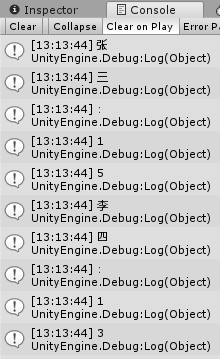
            students.SelectMany(student =>
            {
                return student.Name + ":" + student.Age;
            })
            .ToList()
            .ForEach(singleChar => Debug.Log(singleChar));
运行结果:
③ UniRx链式
            //Coroutine顺序执行
            IEnumerator A()
            {
                yield return new WaitForSeconds(1f);
                Debug.Log("A");
            }
            IEnumerator B()
            {
                yield return new WaitForSeconds(1f);
                Debug.Log("B");
            }
            IEnumerator C()
            {
                yield return new WaitForSeconds(1f);
                Debug.Log("C");
            }
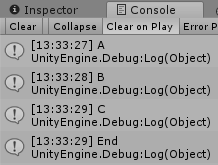
            var aStream = Observable.FromCoroutine(A);
            var bStream = Observable.FromCoroutine(B);
            var cStream = Observable.FromCoroutine(C);
            aStream.SelectMany(bStream.SelectMany(cStream))
                         .Subscribe(_ => Debug.Log("End"));
运行结果:
(5)ToArray
① 说明
ToArray:从 IEnumerable
② Linq链式
var names = students.Select(student => student.Name)
    			   .ToArray();
Array.ForEach(names, name => Debug.Log(name));
③ UniRx链式
Subject<float> subject = new Subject<float>();
subject.TakeLast(TimeSpan.FromSeconds(1.0f))
    .ToArray()
    .Subscribe(times =>
               {
                   Array.ForEach(times, time => Debug.LogFormat("点击时间:{0}", time));
               });

Observable.EveryUpdate()
    .Where(_ => Input.GetMouseButtonDown(0))
    .Subscribe(_ => subject.OnNext(Time.time));
Observable.Timer(TimeSpan.FromSeconds(2.0f))
    .Subscribe(_ => subject.OnCompleted());
(6)ToList
① 说明
ToList:从 IEnumerable
② Linq链式
students.Select(student => student.Name)
    .ToList()
    .ForEach(name => Debug.Log(name));
③ UniRx链式
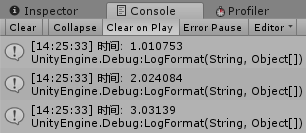
Subject<float> subject = new Subject<float>();
subject.ToList()
    .Subscribe(times =>
               {
                   foreach (float time in times)
                   {
                       Debug.LogFormat("时间:{0}", time);
                   }
               });
Observable.Timer(TimeSpan.FromSeconds(1.0f))
    .Repeat()
    .Take(3)
    .Subscribe(_ => subject.OnNext(Time.time), () => subject.OnCompleted());
运行结果:
2.Paging分页
(1)First
① 说明
First:(有条件得)取数据链中的第一个数据。可以先进行一次条件过滤,再取过滤后的数据链中的第一个数据。
② Linq链式
            Student stu1 = students.First(student => student.Age > 13);
            Debug.Log(stu1.Name);
③ Linq查询表达式
            Student stu2 = (from student in students select student)
                                        .First(student => student.Age > 13);
            Debug.Log(stu2.Name);
④ UniRx链式
            Observable.EveryUpdate()
                              .First(_ => Input.GetMouseButton(0))
                              .Subscribe(_ => Debug.Log("点击鼠标左键"))
                              .AddTo(this);
⑤ UniRx查询表达式(测试无效)
            (from updateEvent in Observable.EveryUpdate() select "点击鼠标左键")
                .First()
                .Subscribe(eventName => Debug.Log(eventName))
                .AddTo(this);
(2)Last
① 说明
Last:(有条件得)取数据链中的最后一个数据。可以先进行一次条件过滤,再取过滤后的数据链中的最后一个数据。
② Linq链式
            Student stu = students.Last(student => student.Age > 13);
            Debug.Log(stu.Name);
③ UniRx链式
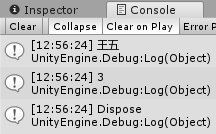
            IObservable<int> observable = Observable.Create<int>(observer =>
            {
                observer.OnNext(1);
                observer.OnNext(2);
                observer.OnNext(3);
                observer.OnCompleted();
                return Disposable.Create(() => Debug.Log("Dispose"));
            });
            observable.Last()
                      .Subscribe(value => Debug.Log(value));
运行结果:
(3)Take
① 说明
Take:从序列的开头返回指定数量的相邻元素。
使用 Take 操作符让你可以修改 Observable 的行为,只返回前面的N项数据,然后发射完成通知,忽略剩余的数据。
② Linq链式
            List<Student> students = new List<Student>()
            {
                new Student{Name="张三",Age=15},
                new Student{Name="李四",Age=13},
                new Student{Name="王五",Age=16},
                new Student{Name="赵六",Age=12},
            };
            students.Take(2)
                          .ToList()
                          .ForEach(stu =>
                          {
                              Debug.Log(stu.Name);
                          });
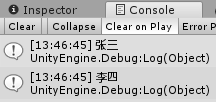
运行结果:
③ UniRx链式
            //获取前3次鼠标点击
            Observable.EveryUpdate()
                              .Where(_ => Input.GetMouseButtonDown(0))
                              .Take(3)
                              .Subscribe(_ => Debug.Log("点击鼠标左键"));
            //Take重载:
            //只响应前五秒:Take(TimeSpan.FromSeconds(5f))
(4)Skip
① 说明
Skip:跳过序列中指定数量的元素,然后返回剩余的元素。
② Linq链式
List<int> grades = new List<int> { 89, 92, 45, 61, 77, 82, 76, 97, 41, 69 };

grades.OrderBy(grade => grade)
    .Skip(2)
    .ToList()
    .ForEach(grade => Debug.Log(grade));
③ UniRx链式
//跳过前三次鼠标左键的点击事件
Observable.EveryUpdate()
		 .Where(_ => Input.GetMouseButtonDown(0))
		 .Skip(3)
		 .Subscribe(_ => Debug.Log("点击鼠标左键"));
//Skip重载:
//跳过前五秒:Skip(TimeSpan.FromSeconds(5f))
(5)GroupBy
① 说明
GroupBy:对序列中的元素进行分组。
② Linq链式
List<Student> students = new List<Student>()
{
    new Student{Name="张三",Age=15},
    new Student{Name="李四",Age=14},
    new Student{Name="王五",Age=14},
    new Student{Name="赵六",Age=15},
    new Student{Name="钱七",Age=13},
    new Student{Name="孙八",Age=14},
};
//按照年龄分组
students.GroupBy(student => student.Age)
    .ToList()
    .ForEach(studentGroup =>
             {
                 studentGroup.ToList()
                     		.ForEach(student =>
                              {
                                  Debug.LogFormat("Group:{0};Name:{1};Age:{2}"
                                                  , studentGroup.Key, student.Name, student.Age);
                              });
             });
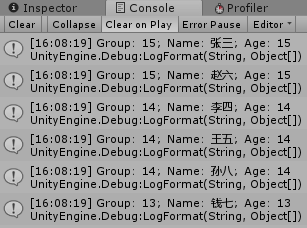
运行结果:
③ Linq查询表达式
var group =
    from student in students
    group student by student.Age into studentGroup
    select studentGroup;
group.ToList()
     .ForEach(studentGroup =>
             {
                 studentGroup.ToList()
                     .ForEach(student =>
                              {
                                  Debug.LogFormat("Group:{0};Name:{1};Age:{2}"
                                                  , studentGroup.Key, student.Name, student.Age);
                              });
             });
④ UniRx链式
            Subject<int> subject = new Subject<int>();

            subject.GroupBy(num => num % 2 == 0 ? "偶数" : "奇数")
                        .Subscribe(numberGroup =>
                        {
                            numberGroup.Subscribe(number =>
                            {
                                Debug.LogFormat("Group:{0};Number:{1}", numberGroup.Key, number);
                            });
                        });

            subject.OnNext(1);
            subject.OnNext(2);
            subject.OnNext(3);
            subject.OnNext(4);
            subject.OnCompleted();//手动调用OnCompleted
            subject.OnNext(5);
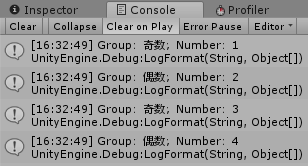
运行结果:
(6)TakeWhile
① 说明
TakeWhile:如果指定的条件为 true,则返回序列中的元素;直到当指定条件为 false 的时候,跳过当前的以及剩余的元素。
② Linq链式
List<string> colors = new List<string> { "red", "orange", "yellow", "green", "blue", "purple" };
//如果指定的条件为 true,则返回序列中的元素;直到当指定条件为false的时候,跳过当前的以及剩余的元素。
colors.TakeWhile(color => color != "yellow")
    .ToList()
    .ForEach(color => Debug.LogFormat("颜色:{0}", color));
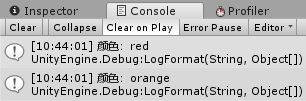
运行结果:
③ UniRx链式
//其中 times 表示 TakeWhile 的执行次数
Observable.EveryUpdate()
    .Where(_ => Input.GetMouseButton(0))
    .TakeWhile((_, times) => Input.GetMouseButtonUp(0) == false && times <= 25)
    .Subscribe(_ => Debug.Log("点击鼠标左键"));
(7)SkipWhile
① 说明
SkipWhile:如果指定的条件为 true,则跳过序列中的元素;直到当指定条件为false的时候,返回当前的以及剩余的元素。(和TakeWhile恰好相反)
② Linq链式
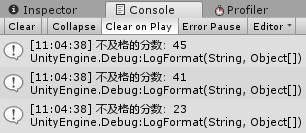
List<int> grades = new List<int> { 45, 41, 92, 68, 77, 84, 62, 88, 98, 95, 23, 75, 81 };
grades.OrderByDescending(grade => grade)
    .SkipWhile(grade => grade >= 60)
    .ToList()
    .ForEach(grade => Debug.LogFormat("不及格的分数:{0}", grade));
运行结果:
③ UniRx链式
Observable.EveryUpdate()
    .SkipWhile((_, times) => Input.GetMouseButtonDown(0) == false && times <= 100)
    .Subscribe(_ => Debug.Log("等待超时或鼠标左键按下"));
(8)TakeLast
① 说明
TakeLast:获取序列的最后几项。
TakseLast操作符是.Net Core提供的。
② UniRx链式
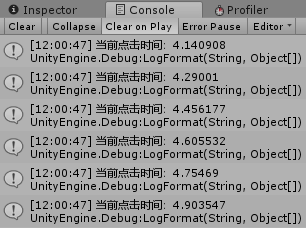
Subject<float> subject = new Subject<float>();
//对subject最后1秒的事件流注册事件
subject.TakeLast(TimeSpan.FromSeconds(1.0f))
    .Subscribe(clickTime => Debug.LogFormat("当前点击时间:{0}", clickTime));

//每次点击鼠标左键时注册subject,并传入当前的点击时间
Observable.EveryUpdate()
    .Where(_ => Input.GetMouseButtonDown(0))
    .Subscribe(_ => subject.OnNext(Time.time));
//5秒后注册subject的结束事件
Observable.Timer(TimeSpan.FromSeconds(5.0f))
    .Subscribe(_ => subject.OnCompleted());
运行结果:
(9)Single
① 说明
Single:返回序列中的单个特定元素,与First非常类似,但是Single要确保其满足条件的元素在序列中只有一个。(若有多个则报异常)
② Linq链式
List<string> colors = new List<string> { "red", "orange", "yellow", "green", "blue" };
Debug.Log(colors.Single(color => color.Length > 4));//报异常
③ UniRx链式
Subject<int> subject = new Subject<int>();
subject.Where(number => number % 2 == 0)
    .Subscribe(number => Debug.Log(number));//报异常

subject.OnNext(1);
subject.OnNext(2);
subject.OnNext(3);
subject.OnNext(4);
subject.OnCompleted();
3.Concatenate联合
(1)Merge
① 说明
Merge:合并事件流
② UniRx链式
var aStream = this.UpdateAsObservable()
    			 .Where(_ => Input.GetMouseButtonDown(0)).Select(_ => "A");
var bStream = this.UpdateAsObservable()
    			 .Where(_ => Input.GetMouseButtonDown(1)).Select(_ => "B");
aStream.Merge(bStream)
       .Subscribe(Debug.Log);
(2)WhenAll
① 说明
WhenAll:判定Observable发射的所有数据是否都满足某个条件。
当所有OnComplete事件都完成时(非顺序执行),再执行WhenAll中注册的事件。
② Linq链式
            List<int> ages = new List<int> { 5, 15, 25, 55, 100 };
            ages.All(age => age > 1);//true
            ages.All(age => age > 10);//false
③ UniRx链式
            IEnumerator A()
            {
                yield return new WaitForSeconds(2f);
                Debug.Log("协程A执行完毕");
            }
            var aStream = Observable.FromCoroutine(A);
            var leftStream = Observable.EveryUpdate()
                .Where(_ => Input.GetMouseButtonDown(0))
                .Take(2)
                .Select(_ =>
                {
                    Debug.Log("点击鼠标左键");
                    return Unit.Default;
                });
            var rightStream = Observable.EveryUpdate()
                .Where(_ => Input.GetMouseButtonDown(1))
                .Take(3)
                .Select(_ =>
                {
                    Debug.Log("点击鼠标右键");
                    return Unit.Default;
                });
            Observable.WhenAll(aStream, leftStream, rightStream)
                              .Subscribe(_ => Debug.Log("All Completed"));
(3)Concat
① 说明
Concat:顺序连接数据。
② Linq链式
            List<int> classA = new List<int> { 1, 2, 3 };
            List<int> classB = new List<int> { 4, 5, 6 };
            //顺序输出1,2,3,4,5,6
            classA.Concat(classB)
                      .ToList()
                      .ForEach(value => Debug.Log(value));
③ UniRx链式
            var aStream = Observable.EveryUpdate()
                .Where(_ => Input.GetMouseButtonDown(0))
                .Select(_ => "点击鼠标左键")
                .Take(2);
            var bStream = Observable.EveryUpdate()
                .Where(_ => Input.GetMouseButtonDown(1))
                .Select(_ => "点击鼠标右键")
                .Take(3);
            aStream.Concat(bStream)
                          .Subscribe(eventName => Debug.Log(eventName));
(4)Zip
① 说明
Zip:将指定函数应用于两个序列的对应元素,以生成结果序列。
② Linq链式
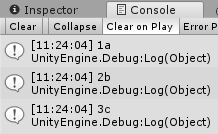
List<int> nums = new List<int> { 1, 2, 3, 4 };
List<string> strs = new List<string> { "a", "b", "c" };
nums.Zip(strs, (first, second) => first + second)
    .ToList()
    .ForEach(_ => Debug.Log(_));
运行结果:
③ UniRx链式
var leftStream = Observable.EveryUpdate().Where(_ => Input.GetMouseButtonDown(0));
var rightStream = Observable.EveryUpdate().Where(_ => Input.GetMouseButtonDown(1));
leftStream.Zip(rightStream, (l, r) => Unit.Default)
    .Subscribe(_ => Debug.Log("完成一对鼠标左右键点击"));
4.Conversion转化
(1)OfType
① 说明
OfType:筛选类型。
② Linq链式
            List<object> objs = new List<object> { 1, 2, "3", 4, 5, "6", 7, 8 };
            //筛选出string类型
            objs.OfType<string>()
                   .ToList()
                   .ForEach(value => Debug.Log(value));
③ UniRx链式
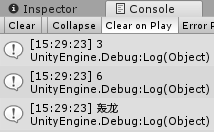
        public class Enemy { public string Name { get; set; } }
        public class Boss : Enemy { }
        public class Monster : Enemy { }

            Subject<Enemy> enemies = new Subject<Enemy>();
            enemies.OfType<Enemy, Boss>()
                         .Subscribe(boss => Debug.Log(boss.Name));

            enemies.OnNext(new Monster { Name = "黄速龙" });
            enemies.OnNext(new Monster { Name = "蓝速龙" });
            enemies.OnNext(new Boss { Name = "轰龙" });
            enemies.OnCompleted();//可手动调用OnCompleted
            enemies.OnNext(new Boss { Name = "电龙" });
运行结果:
(2)Cast
① 说明
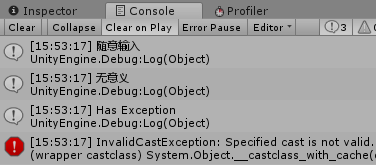
Cast:将 IEnumerable 的元素强制转换为指定的类型。如果类型不可强制转化则报异常。
② Linq链式
            List<object> objs = new List<object> { "1", "2", "3" };
            //将object强制转换为string
            objs.Cast<string>()
                   .ToList()
                   .ForEach(value => Debug.Log(value));
③ UniRx链式
            Subject<object> subject = new Subject<object>();
            subject.Cast<object, string>()
                       .Subscribe(str =>
                       {
                           Debug.Log(str);
                       }, exception =>
                       {
                           Debug.Log("Has Exception");
                           Debug.LogException(exception);
                       });
            subject.OnNext("随意输入");
            subject.OnNext("无意义");
            subject.OnNext(25);
            subject.OnCompleted();
运行结果:
5.Creation创建
(1)Start
① 说明
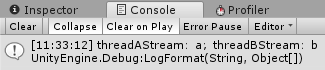
Start: 开启多线程
ObserveOnMainThread:将对线程转入主线程
注意:各个线程中的返回值将被Subscribe按WhenAll中参数的顺序接收
② UniRx链式
    public class ThreadExample : MonoBehaviour
    {
        private void Start()
        {
            //使用Start开启线程
            var threadAStream = Observable.Start(() =>
            {
                Thread.Sleep(TimeSpan.FromSeconds(5));
                return "a";
            });
            var threadBStream = Observable.Start(() =>
            {
                Thread.Sleep(TimeSpan.FromSeconds(1));
                return "b";
            });
            //使用ObserveOnMainThread将线程转入到主线程中
            //各个线程中的返回值将被Subscribe按WhenAll中参数的顺序接收
            Observable.WhenAll(threadAStream, threadBStream)
                .ObserveOnMainThread()
                .Subscribe(results => Debug.LogFormat("threadAStream:{0};threadBStream:{1}", results[0], results[1]));
        }
    }
运行结果:
(2)Range
① 说明
Range:生成指定范围内的整数的序列。
② Linq链式
//输出4,9,16
Enumerable.Range(2, 3)
    .Select(num => num * num)
    .ToList()
    .ForEach(num => Debug.Log(num));
③ UniRx链式
//输出4,9,16
Observable.Range(2, 3)
    .Select(num => num * num)
    .Subscribe(num => Debug.Log(num));
(3)Repeat
① 说明
Repeat:在生成序列中重复该值的次数。
在UniRx中Repeat表示重复,但不能指定重复次数,会不停重复下去。
② Linq链式
Enumerable.Repeat("HuskyT", 3)
    .ToList()
    .ForEach(_ => Debug.Log(_));
③ UniRx链式
Observable.Timer(TimeSpan.FromSeconds(1f))
    .Repeat()
    .Subscribe(_ => Debug.Log("过了一秒"));
(4)Empty
① 说明
Empty:返回具有指定类型参数的空 IEnumerable
② Linq链式
List<int> list = Enumerable.Empty<int>().ToList();
Debug.Log(list.Count);//结果:0
③ UniRx链式
//会立即执行OnCompleted事件
Observable.Empty<int>()
    .Subscribe(_ => { }, () => Debug.Log("Completed"));
6.Aggregate聚合
(1)Aggregate
① 说明
Aggregate:对序列应用累加器函数。 将指定的种子值用作累加器的初始值,并使用指定的函数选择结果值。
② Linq链式
List<int> grades = new List<int> { 23, 45, 61, 67, 77, 88, 92 };
//求最小值
int minGrade = grades.Aggregate((min, next) => min > next ? next : min);
Debug.Log(minGrade);
③ UniRx链式
Subject<int> subject = new Subject<int>();
//求最大值
subject.Aggregate((max, next) => max >= next ? max : next)
    .Subscribe(max => Debug.Log(max));
subject.OnNext(23);
subject.OnNext(45);
subject.OnNext(61);
subject.OnNext(92);
subject.OnCompleted();
三、Rx.Net与UniRx
1.Common常用
(1)Do
① 说明
Do:注册一个动作,作为原始 Observable 生命周期事件的一种占位符
Do 和 Delay 组合使用可以作为协程
② UniRx链式
Observable.ReturnUnit()
    	  .Delay(TimeSpan.FromSeconds(1.0f))
    	  .Do(_ => Debug.Log("after 1 second"))
    	  .Delay(TimeSpan.FromSeconds(1.0f))
    	  .Do(_ => Debug.Log("after 2 second"), () => Debug.Log("completed"))
    	  .Subscribe();
(2)Materialize 和 Dematerialize
① 说明
Materialize:Materialize 将数据项和事件通知都当做数据项发射

一个合法的有限的 Obversable 将调用它的观察者的 onNext 方法零次或多次,然后调用观察者的 onCompleted 或 onError 正好一次。Materialize 操作符将这一系列调用,包括原来的 onNext 通知和终止通知 onCompleted 或 onError 都转换为一个 Observable 发射的数据序列。

Dematerialize 操作符是 Materialize 的逆向过程,它将 Materialize 转换的结果还原成它原本的形式。 Dematerialize 反转这个过程,将原始 Observable 发射的 Notification 对象还原成 Observable 的通知。
② UniRx链式
var subject = new Subject<int>();
var onlyException = subject.Materialize()
    					 .Where(_ => _.Exception != null)
    					 .Dematerialize();
subject.Subscribe(_ => Debug.LogFormat("subject:{0}", _), e => Debug.LogFormat("subject 异常:{0}", e));
onlyException.Subscribe(_ => Debug.LogFormat("onlyException:{0}", _), e => Debug.LogFormat("onlyException 异常:{0}", e));

subject.OnNext(25);
subject.OnError(new Exception("自定义异常"));
运行结果:

(3)IgnoreElements
① 说明
IgnoreElements:不发射任何数据,只发射 Observable 的 完成 / 错误 通知
② UniRx链式
var subject = new Subject<int>();
var ignoreElements = subject.IgnoreElements();
subject.Subscribe(_ => Debug.LogFormat("subject onNext:{0}", _), () => Debug.Log("subject onCompleted"));
ignoreElements.Subscribe(_ => Debug.LogFormat("ignoreElements onNext:{0}", _), () => Debug.Log("ignoreElements onCompleted"));

subject.OnNext(1);
subject.OnNext(2);
subject.OnCompleted();
运行结果:

(4)DistinctUntilChanged
① 说明
DistinctUntilChanged:遇到相同的就会剔除,直到遇到不同的
② UniRx链式
//可用于监听状态改变
string state = "Idle State";
Observable.EveryUpdate()
    	  .DistinctUntilChanged(_ => state)
    	  .Subscribe(_ => Debug.LogFormat("状态改变为:{0}", state));
Observable.ReturnUnit()
    	  .Delay(TimeSpan.FromSeconds(2.0f))
    	  .Do(_ => state = "Jump State")
    	  .Delay(TimeSpan.FromSeconds(2.0f))
    	  .Do(_ => state = "Run State")
    	  .Subscribe();
运行结果:

2.Paging分页
(1)TakeUntil
① 说明
TakeUntil:如果指定的条件为 false,则返回序列中的元素;直到当指定条件为 true 的时候,跳过当前的以及剩余的元素。(与TakeWhile恰好相反)
② UniRx链式
Observable.EveryUpdate()
    .TakeUntil(Observable.EveryUpdate().Where(_ => Input.GetMouseButtonDown(0)))
    .Subscribe(_ => Debug.Log("等待点击鼠标左键"));
(2)SkipUntil
① 说明
SkipUntil:丢弃原始 Observable 发射的数据,直到第二个 Observable 发射了一项数据。(与TakeUntil相反)
② UniRx链式
var clickStream = this.UpdateAsObservable()
    .Where(_ => Input.GetMouseButtonDown(0));
//等待鼠标点击=>打印50次=>等待鼠标点击=>打印50次=>...
//Repeat会重复整个链式循环
Observable.EveryUpdate()
    .SkipUntil(clickStream)
    .Take(50)
    .Repeat()
    .Subscribe(_ => Debug.Log("标记"));
(3)Buffer
① 说明
Buffer:缓冲一定时间内的事件,然后一次性输出。
② UniRx链式
//缓冲一定时间内的事件,然后一次性输出
Observable.Interval(TimeSpan.FromSeconds(1.0f))
    .Buffer(TimeSpan.FromSeconds(5.0f))
    .Subscribe(dataList =>
               {
                   Debug.Log("dataList:");
                   dataList.ToList()
                       .ForEach(data => Debug.Log(data));

               });
3.Concatenate联合
(1)Switch
① 说明
Switch:将一个发射多个 Observables 的 Observable 转换成另一个单独的 Observable,后者发射那些 Observables 最近发射的数据项

Switch 订阅一个发射多个 Observables 的 Observable。它每次观察那些 Observables 中的一个,Switch 返回的这个 Observable 取消订阅前一个发射数据的 Observable,开始发射最近的 Observable 发射的数据。
注意:当原始 Observable 发射了一个新的 Observable 时(不是这个新的 Observable 发射了一条数据时),它将取消订阅之前的那个 Observable。这意味着,在后来那个 Observable 产生之后到它开始发射数据之前的这段时间里,前一个 Observable 发射的数据将被丢弃(就像图例上的那个黄色圆圈一样)。
② UniRx链式
            var qObservable = Observable.EveryUpdate().Where(_ => Input.GetKeyDown(KeyCode.Q));
            var wObservable = Observable.EveryUpdate().Where(_ => Input.GetKeyDown(KeyCode.W));
            var eObservable = Observable.EveryUpdate().Where(_ => Input.GetKeyDown(KeyCode.E));
            //点击 Q W E 后获得彩蛋
            qObservable.Select(_ =>
            {
                Debug.Log("点击Q");
                return wObservable;
            })
            .Switch()
            .Select(_ =>
            {
                Debug.Log("点击W");
                return eObservable;
            })
            .Switch()
            .Take(1)
            .Repeat()
            .Subscribe(_ =>
            {
                Debug.Log("点击R");
                Debug.Log("获得彩蛋!");
            });
(2)StartWith
① 说明
StartWith:如果想要一个 Observable 在发射数据之前先发射一个指定的数据序列,可以使用 StartWith 操作符。(如果想一个 Observable 发射的数据末尾追加一个数据序列可以使用 Concat 操作符。)
② UniRx链式
//输出:https://huskytgame.github.io
Observable.Return("huskytgame")
    	  .StartWith(new List<string> { "https", ":", "//" })
    	  .Concat(Observable.Return(".github"), Observable.Return(".io"))
    	  .Aggregate(string.Empty, (aggregateStr, currentStr) => aggregateStr + currentStr)
    	  .Subscribe(_ => Debug.Log(_));
(3)CombineLatest
① 说明
CombineLatest:当两个 Observables 中的任何一个发射了数据时,使用一个函数结合每个 Observable 发射的最近数据项,并且基于这个函数的结果发射数据。

CombineLatest 操作符行为类似于 Zip。
但是只有当原始的 Observable 中的每一个都发射了一条数据时 Zip 才发射数据。
CombineLatest 则在原始的 Observable 中任意一个发射了数据时发射一条数据。当原始 Observables 的任何一个发射了一条数据时,CombineLatest 使用一个函数结合它们最近发射的数据,然后发射这个函数的返回值。
② UniRx链式
int left = 0;
int right = 0;
var leftObservable = Observable.EveryUpdate()
    .Where(_ => Input.GetMouseButtonDown(0))
    .Select(_ => (left += 1).ToString());
var rightObservable = Observable.EveryUpdate()
    .Where(_ => Input.GetMouseButtonDown(1))
    .Select(_ => (right += 1).ToString());
leftObservable.CombineLatest(rightObservable, (l, r) => l + r)
    .Subscribe(_ => Debug.Log(_));
(4)PairWise
① 说明
PairWise:只有事件源是成对的,才会输出。
② UniRx链式
Observable.Range(0, 3)
    	  .Pairwise()
    	  .Subscribe(pair => Debug.LogFormat("current:{0};previous:{1}", pair.Current, pair.Previous));
运行结果:

4.Conversion转化
5.Creation创建
(1)Return
① 说明
Return:可以立即返回任何数据。
② UniRx链式
Observable.Return(Unit.Default)
    .Delay(TimeSpan.FromSeconds(1.0f))
    .Repeat()
    .Subscribe(_ => Debug.Log("after one second"));
(2)Defer
① 说明
Defer:直到有观察者订阅时才创建 Observable,并且为每个观察者创建一个新的 Observable。
Defer 操作符会一直等待直到有观察者订阅它,然后它使用 Observable 工厂方法生成一个 Observable。它对每个观察者都这样做,因此尽管每个订阅者都以为自己订阅的是同一个 Observable,事实上每个订阅者获取的是它们自己的单独的数据序列。 在某些情况下,等待直到最后一分钟(就是知道订阅发生时)才生成 Observable ,可以确保 Observable 包含最新的数据。
② UniRx链式
var deferRandom = new System.Random();
//每隔1秒打印一个随机数,一共打印4个
Observable.Defer(() => Observable.Start(() => deferRandom.Next()))
    	  .Delay(TimeSpan.FromSeconds(1.0f))
    	  .Repeat()
    	  .Take(4)
    	  .Subscribe(randomNum => Debug.Log(randomNum));
(3)Never
① 说明
Never:创建一个不发射数据也不终止的Observable,暂时没用
② UniRx链式
//Never:创建一个Observable,但什么也不做
var never = Observable.Never<string>();
never.Subscribe(_ => Debug.Log(_), () => Debug.Log("Completed"));//无任何输出
(4)Create
① 说明
Create:使用一个函数从头开始创建一个Observable
你可以使用 Create 操作符从头开始创建一个 Observable ,给这个操作符传递一个接受观察者作为参数的函数,编写这个函数让它的行为表现为一个 Observable 恰当的调用观察者的 onNext,onError 和 onCompleted 方法。
一个形式正确的有限 Observable 必须尝试调用观察者的 onCompleted 正好一次或者它的 onError 正好一次,而且此后不能再调用观察者的任何其它方法。
② UniRx链式
            Observable.Create<int>(observable =>
            {
                observable.OnNext(1);
                observable.OnNext(2);
                Observable.Timer(TimeSpan.FromSeconds(2.0f))
                          .Subscribe(_ => observable.OnCompleted());
                return Disposable.Create(() => Debug.Log("观察者已取消订阅"));
            })
            .Subscribe(num => Debug.Log(num));
运行结果:

(5)Throw 和 Catch
① 说明
Throw:创建一个不发射数据以一个错误终止的 Observable。
Catch:错误捕捉。从onError通知中恢复发射数据。
② UniRx链式
//Throw:创建一个只会抛出异常的Observable
Observable.Throw<string>(new Exception("异常信息"))
    	  .Subscribe(_ => Debug.Log("此处不会输出信息")
               , e => Debug.LogErrorFormat("打印错误:{0}", e.Message));
运行结果:

//Catch:用于异常捕捉
Observable.Throw<string>(new Exception("发生xxx异常"))
    	  .Catch<string, Exception>(e =>
    	  {
                 Debug.LogFormat("捕获到异常:{0}", e.Message);
                 return Observable.Timer(TimeSpan.FromSeconds(2.0f))
                                  .Select(_ => "两秒后");
    	  })
    	  .Subscribe(_ => Debug.Log(_));
运行结果:

6.Aggregate 聚合
(1)Scan(扫描)
① 说明
Scan:连续地对数据序列的每一项应用一个函数,然后连续发射结果
与 Aggregate 类似,但是 Scan 是每次进行输出,而 Aggregate 则是结束计算后进行输出。

Scan 操作符对原始 Observable 发射的第一项数据应用一个函数,然后将那个函数的结果作为自己的第一项数据发射。
它将函数的结果同第二项数据一起填充给这个函数来产生它自己的第二项数据。它持续进行这个过程来产生剩余的数据序列。这个操作符在某些情况下被叫做 accumulator(累加器)。
② UniRx链式
//Scan:累加器
//从10开始,依次累加5
//输出:15  20  25
Observable.Range(1, 3)
    .Scan(10, (accumulateValue, currentValue) => accumulateValue += 5)
    .Subscribe(value => Debug.Log(value));
7.Time时间
(1)Timer
① 说明
Timer:创建一个Observable,它在一个给定的延迟后发射一个特殊的值。
② UniRx链式
Observable.Timer(TimeSpan.FromSeconds(5.0f))
    	  .Subscribe(_ => Debug.Log("after 5 second"));
(2)Interval
① 说明
Interval:时间间隔。每间隔一定时间发射一个事件。
② UniRx链式
//每隔1秒打印一次当前时间
Observable.Interval(TimeSpan.FromSeconds(1.0f))
   		  .Subscribe(_ => Debug.Log(Time.time));
(3)Throttle(节流阀)
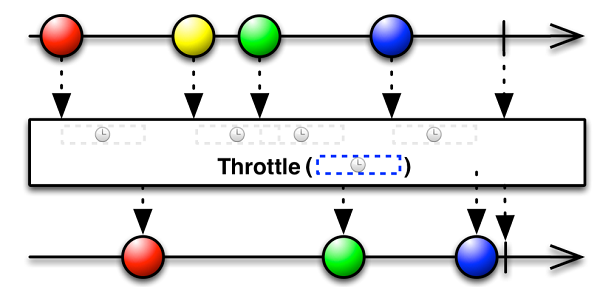
① 说明
Throttle:仅在过了一段指定的时间还没发射数据时才发射一个数据
② UniRx链式
Observable.EveryUpdate()
   		  .Where(_ => Input.GetMouseButtonDown(0))
    	  .Throttle(TimeSpan.FromSeconds(2.0f))
    	  .Subscribe(_ => Debug.Log("两秒内未点击鼠标"));
(4)Delay
① 说明
Delay:延迟一段指定的时间再发射来自Observable的发射物
② UniRx链式
//延时
Observable.EveryUpdate()
   		  .Where(_ => Input.GetMouseButtonDown(0))
   		  .Delay(TimeSpan.FromSeconds(1.0f))
   		  .Subscribe(_ => Debug.Log("点击鼠标后一秒"));
(5)Sample
① 说明
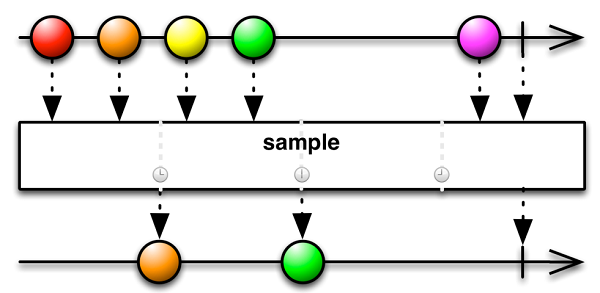
Sample:定期发射 Observable 最近发射的数据项。
定期进行采样,然后发射事件流中最近的事件。
② UniRx链式
int clickTime = 0;
Observable.EveryUpdate()
    .Where(_ => Input.GetMouseButtonDown(0))
    .Select(_ => clickTime++)
    .Sample(TimeSpan.FromSeconds(2.0f))
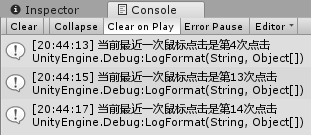
    .Subscribe(currentClickTime => Debug.LogFormat("当前最近一次鼠标点击是第{0}次点击", currentClickTime));
运行结果:
(6)Timestamp(时间戳)
① 说明
Timestamp:给 Observable 发射的数据项附加一个时间戳
② UniRx链式
Observable.EveryUpdate()
    .Timestamp()
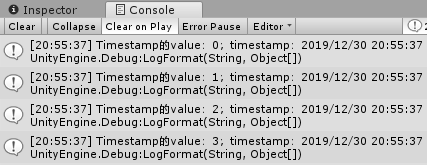
    .Subscribe(timestamp => Debug.LogFormat("Timestamp的value:{0};timestamp:{1}", timestamp.Value, timestamp.Timestamp.LocalDateTime));
运行结果:
(7)ThrottleFirst
① 说明
ThrottleFirst:会立即响应某事件,然后在采样周期内屏蔽其他事件流。
② UniRx链式
//点击鼠标后会立即响应点击事件,然后3秒内不再响应
Observable.EveryUpdate()
    	  .Where(_ => Input.GetMouseButtonDown(0))
   	  	  .ThrottleFirst(TimeSpan.FromSeconds(3.0f))
    	  .Subscribe(_ => Debug.Log("鼠标点击"));
(8)TimeInterval
① 说明
TimeInterval:将一个发射数据的 Observable 转换为距离上一个事件的时间间隔
② UniRx链式
Observable.Interval(TimeSpan.FromSeconds(1.5f))
    	  .TimeInterval()
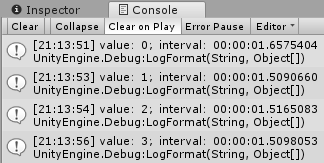
    	  .Subscribe(timeInterval => Debug.LogFormat("value:{0};interval:{1}", timeInterval.Value, timeInterval.Interval));
运行结果:
(9)Timeout
① 说明
Timeout:对原始 Observable 的一个镜像,如果过了一个指定的时长仍没有发射数据,它会发一个错误通知(OnError 事件)
② UniRx链式
//Timeout:常用于网络请求
ObservableWWW.Get("https://huskytgame.github.io/")
    		.Timeout(TimeSpan.FromSeconds(2.0f))
    		.Subscribe(_ => Debug.Log("成功打开网页"), e => Debug.LogErrorFormat("超时,异常:{0}", e));
(10)DelaySubscription
① 说明
DelaySubscription:延时注册,Observable 在注册之后会跳过一段时间的事件流。
② UniRx链式
//跳过前两秒的事件流
Observable.Interval(TimeSpan.FromSeconds(0.5f))
    	  .Select(_ => Time.time)
    	  .DelaySubscription(TimeSpan.FromSeconds(2.0f))
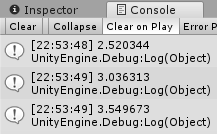
    	  .Take(3)
    	  .Subscribe(_ => Debug.Log(_));
运行结果:
8.Concurrency 并发
(1)Amb
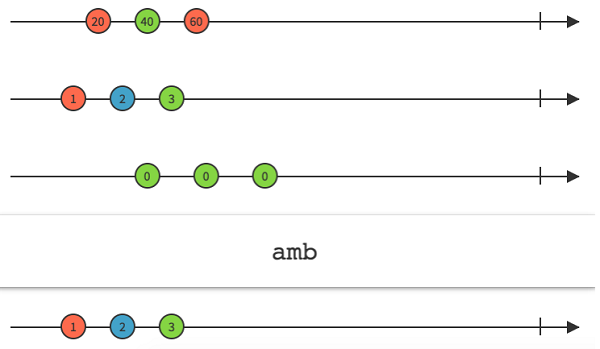
① 说明
Amb:给定两个或多个 Observable,它只发射最先发射数据或通知的那个 Observable 的所有数据
② UniRx链式
            Observable.Amb
                (
                Observable.Timer(TimeSpan.FromSeconds(5.0f)).Select(observableName => "5 seconds"),
                Observable.Timer(TimeSpan.FromSeconds(2.0f)).Select(observableName => "2 seconds"),
                Observable.Timer(TimeSpan.FromSeconds(6.0f)).Select(observableName => "6 seconds"),
                Observable.Timer(TimeSpan.FromSeconds(3.0f)).Select(observableName => "3 seconds")
                )
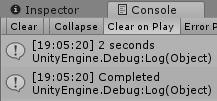
                .Subscribe(observableName => Debug.Log(observableName), () => Debug.Log("Completed"));
运行结果:
9.Events 事件
(1)FromEvent
① 说明
FromEvent:将其它种类的对象和数据类型转换为Observable
② UniRx链式
Observable.EveryUpdate()
    	  .Where(_ => Input.GetMouseButtonDown(0))
    	  .Subscribe(_ => mOnMouseDownEvent?.Invoke());
//FromEvent:将事件转化为Observable
Observable.FromEvent(action => mOnMouseDownEvent += action, action => mOnMouseDownEvent -= action)
    	  .First()
    	  .Subscribe(_ => Debug.Log("点击鼠标左键"));
(2)FromEventPatter
① 说明
FromEventPatter:
② UniRx链式
10.Bindings 绑定
(1)Publish 与 Connect
① 说明
Publish:将普通的 Observable 转换为可连接的 Observable。
Connect:让一个可连接的 Observable 开始发射数据给订阅者。
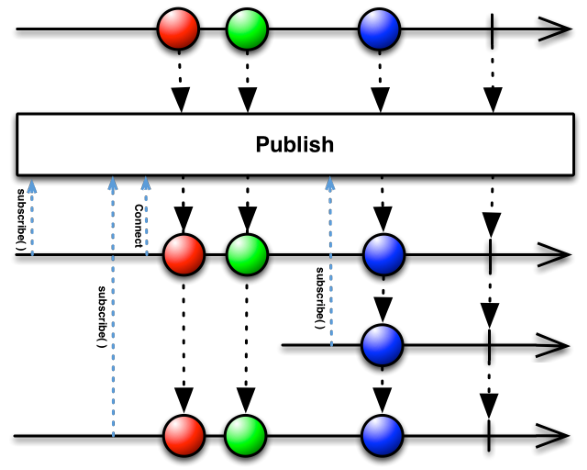
可连接的 Observable (connectable Observable)与普通的 Observable 差不多,不过它并不会在被订阅时开始发射数据,而是直到使用了 Connect 操作符时才会开始。用这种方法,你可以在任何时候让一个 Observable 开始发射数据。
② UniRx链式
var unShare = Observable.Range(1, 2);
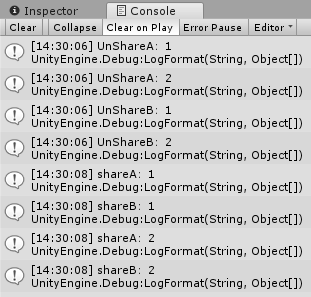
//未经过Publish的事件源会分别输出
var unShareA = unShare.Subscribe(_ => Debug.LogFormat("UnShareA:{0}", _));
var unShareB = unShare.Subscribe(_ => Debug.LogFormat("UnShareB:{0}", _));

var share = unShare.Publish();
var shareA = share.Subscribe(_ => Debug.LogFormat("shareA:{0}", _));
var shareB = share.Subscribe(_ => Debug.LogFormat("shareB:{0}", _));
//Connect:两秒后执行  连接  操作
//经过Publish的事件源会同步输出
Observable.Timer(TimeSpan.FromSeconds(2.0f))
    	  .Subscribe(_ => share.Connect());
运行结果:
(2)RefCount
① 说明
RefCount:让一个可连接的 Observable 行为像普通的Observable
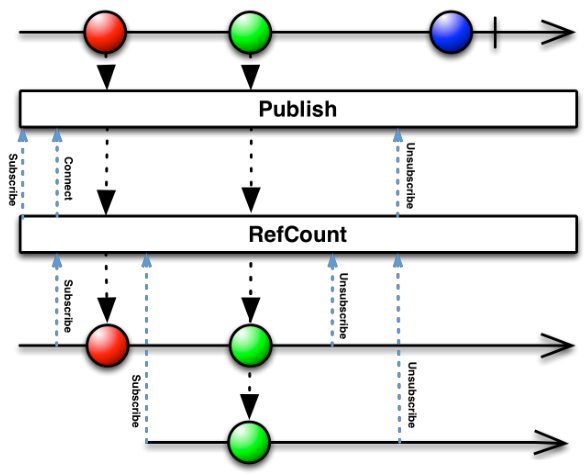
可连接的 Observable (connectable Observable)与普通的 Observable 差不多,不过它并不会在被订阅时开始发射数据,而是直到使用了 Connect 操作符时才会开始。用这种方法,你可以在任何时候让一个 Observable 开始发射数据。 RefCount 操作符把从一个可连接的 Observable 连接和断开的过程自动化了。它操作一个可连接的 Observable,返回一个普通的 Observable。当第一个订阅者订阅这个 Observable 时,RefCount 连接到下层的可连接 Observable。RefCount 跟踪有多少个观察者订阅它,直到最后一个观察者完成才断开与下层可连接 Observable 的连接。
② UniRx链式
var refCountObservable = Observable.Interval(TimeSpan.FromSeconds(1f))
    					.Do(_ => Debug.LogFormat("publish:{0}", _))
    					.Publish()
    					.RefCount();
var refCountObservableA = refCountObservable.Subscribe(_ => Debug.LogFormat("refCountObservableA:{0}", _));
yield return new WaitForSeconds(2.0f);
var refCountObservableB = refCountObservable.Subscribe(_ => Debug.LogFormat("refCountObservableB:{0}", _));
yield return new WaitForSeconds(2.0f);
refCountObservableA.Dispose();
yield return new WaitForSeconds(5.0f);
//最后一个 Observable 注销 (Dispose) 之后,refCountObservable 才断开
refCountObservableB.Dispose();
(3)Replay
① 说明
Replay:保证所有的观察者收到相同的数据序列,即使它们在Observable开始发射数据之后才订阅
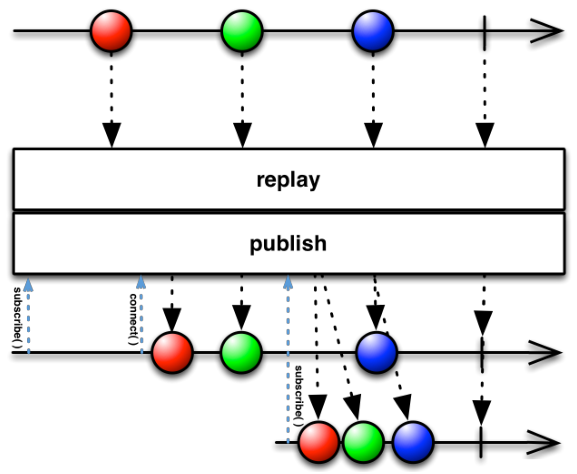
如果在将一个 Observable 转换为可连接的 Observable 之前对它使用 Replay 操作符,产⽣生的这个可连接 Observable 将总是发射完整的数据序列给任何未来的观察者,即使那些观察者在这个 Observable 开始给其它观察者发射数据之后才订阅。
② UniRx链式
var replayObservable = Observable.Interval(TimeSpan.FromSeconds(1.0f))
    					.Do(_ => Debug.LogFormat("replay:{0}", _))
    					.Replay();
replayObservable.Subscribe(_ => Debug.LogFormat("A:{0}", _));
replayObservable.Connect();
Observable.Timer(TimeSpan.FromSeconds(3f))
    	  .Subscribe(_ => replayObservable.Subscribe(l => Debug.LogFormat("B:{0}", l)));
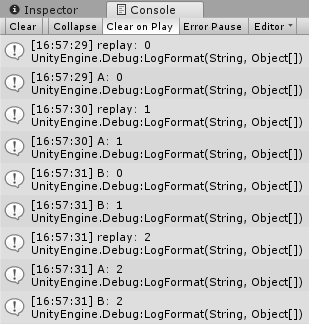
运行结果:
11.ErrorHandling 错误处理
(1)Catch
① 说明
Catch:错误捕捉。从onError通知中恢复发射数据。
//Catch:用于异常捕捉
Observable.Throw<string>(new Exception("发生xxx异常"))
    	  .Catch<string, Exception>(e =>
    	  {
                 Debug.LogFormat("捕获到异常:{0}", e.Message);
                 return Observable.Timer(TimeSpan.FromSeconds(2.0f))
                                  .Select(_ => "两秒后");
    	  })
    	  .Subscribe(_ => Debug.Log(_));
运行结果:
(2)Finally
① 说明
Finally:注册一个动作,当它产生的 Observable 正常终止之后会被调用,或产生异常之前调用。
② UniRx链式
var subject = new Subject<int>();
var result = subject.Finally(() => Debug.Log("Finally action run"));
result.Subscribe(_ => Debug.LogFormat("OnNext:{0}", _), () => Debug.Log("Completed"));
subject.OnNext(1);
subject.OnNext(2);
//subject.OnError(new Exception("自定义异常"));
subject.OnCompleted();


四、Unity与UniRx
(1)NextFrame
① 说明
NextFrame:略过一帧。不是下一帧,而是下两帧。
如果需要精确到下一帧,使用协程更准确一些。
② UniRx链式
private void Start()
{
    Debug.Log(Time.frameCount);
    Observable.NextFrame()
        	  .Subscribe(_ => Debug.LogFormat("Observable NextFrame:{0}", Time.frameCount));
    StartCoroutine(NextFrame(() => Debug.LogFormat("Coroutine NextFrame:{0}", Time.frameCount)));
}
IEnumerator NextFrame(Action cb)
{
    yield return null;
    cb?.Invoke();
}
运行结果:

(2)DelayFrame
① 说明
DelayFrame:延时帧。延时参数+1帧。
② UniRx链式
Debug.Log(Time.frameCount);
Observable.ReturnUnit()
    	  .Do(_ => Debug.Log(Time.frameCount))
    	  .DelayFrame(10)
    	  .Subscribe(_ => Debug.LogFormat("DelayFrame后:{0}", Time.frameCount));

(3)FrameInterval
① 说明
FrameInterval:帧间隔。
② UniRx链式
//距离上一次鼠标点击所间隔的帧数
Observable.EveryUpdate()
    	  .Where(_ => Input.GetMouseButtonDown(0))
    	  .Timestamp()
    	  .TimeInterval()
    	  .FrameInterval()
    	  .Subscribe(frameInterval =>
           {
                 Debug.LogFormat("当前累计帧数:{0};距离上一次点击的帧数:{1};距离上一次点击的时间间隔:{2};当前时间:{3}", frameInterval.Value, frameInterval.Interval, frameInterval.Value.Interval, frameInterval.Value.Value.Timestamp.LocalDateTime);
           });
(4)BatchFrame
① 说明
BatchFrame:收集一定帧数内的事件
② UniRx链式
//收集每一百帧的点击事件,然后输出
Observable.EveryUpdate()
    .Where(_ => Input.GetMouseButtonDown(0))
    .BatchFrame(100, FrameCountType.EndOfFrame)
    .Subscribe(clicks => Debug.LogFormat("100帧内点击{0}次", clicks.Count));
(5)ForEachAsync
① 说明
ForEachAsync:类似于 Do。可以不需要 Subscribe 就能获取数据。
② UniRx链式
//输出1,2,3
Observable.Range(1, 3)
    	  .ForEachAsync(number => Debug.Log(number));
(6)FrameTimeInterval
① 说明
FrameTimeInterval:帧间隔。精度不如 TimeInterval
② UniRx链式
Observable.EveryUpdate()
    	  .Where(_ => Input.GetMouseButtonDown(0))
    	  .FrameTimeInterval()
    	  .Subscribe(frameInterval => Debug.Log(frameInterval.Interval));
(7)SampleFrame
① 说明
SampleFrame:对帧进行采样。
② UniRx链式
Observable.EveryUpdate()
    .SampleFrame(10)
    .Subscribe(frameCount =>
               {
                   Debug.Log(frameCount);
                   GC.Collect();//每10帧执行一次GC
               });
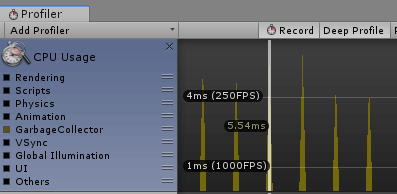
运行结果:可以看出,每10帧执行一次GC操作(常见的优化技巧)
(8)RepeatUntilDestroy
① 说明
RepeatUntilDestroy:重复,直到 GameObject 销毁。使用 Repeat 则在GameObject销毁时也不会注销。
② UniRx链式
Observable.Timer(TimeSpan.FromSeconds(1.0f))
    	  .RepeatUntilDestroy(this)
    	  .Subscribe(_ => Debug.Log(Time.time));
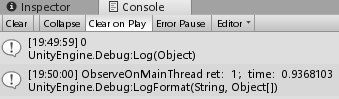
(9)ObserveOnMainThread
① 说明
ObserveOnMainThread:将其他线程转换到主线程。
Start 开启线程
② UniRx链式
            Debug.Log(Time.time);
            Observable.Start(() =>
            {
                Thread.Sleep(1000);
                return 1;
            })
            .ObserveOnMainThread()
            .Subscribe(threadResult => Debug.LogFormat("ObserveOnMainThread ret:{0};time:{1}", threadResult, Time.time));
运行结果:
(10)DelayFrameSubscriptionExample
① 说明
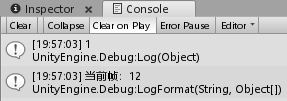
DelayFrameSubscriptionExample:延迟指定帧(参数+1帧)数后,注册事件。
② UniRx链式
Debug.Log(Time.frameCount);
Observable.ReturnUnit()
    	  .DelayFrameSubscription(10)
    	  .Subscribe(_ => Debug.LogFormat("当前帧:{0}", Time.frameCount));
运行结果:
(11)ThrottleFirstFrame
① 说明
ThrottleFirstFrame:每隔指定帧,发送第一个事件
② UniRx链式
Observable.EveryUpdate()
    	  .Where(_ => Input.GetMouseButtonDown(0))
    	  .ThrottleFirstFrame(100)
    	  .Subscribe(_ => Debug.Log("click"));
(12)ThrottleFrame
① 说明
ThrottleFrame:鼠标点击的 100 帧内,若没有鼠标点击事件,则在 100 帧后输出,否则重新计算帧数。
② UniRx链式
Observable.EveryUpdate()
    	  .Where(_ => Input.GetMouseButtonDown(0))
    	  .ThrottleFrame(100)
    	  .Subscribe(_ => Debug.Log("click"));
(13)TimeoutFrame
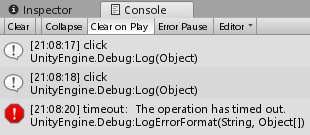
① 说明
TimeoutFrame:超时帧。
② UniRx链式
Observable.EveryUpdate()
    	  .Where(_ => Input.GetMouseButtonDown(0))
    	  .Timeout(TimeSpan.FromSeconds(2.0f))
    	  .Subscribe(_ => Debug.Log("click"), e => Debug.LogErrorFormat("timeout:{0}", e.Message));
运行结果:
(14)TakeUntilDestroy
① 说明
TakeUntilDestroy:功能和 TakeUntil 一致,加上了和 GameObject 生命周期的绑定。销毁 GameObject 后就注销 Observable。
(15)TakeUntilDisable
① 说明
TakeUntilDisable:功能和 TakeUntil 一致,加上了和 MonoBehaviour 生命周期的绑定。Disable 该脚本后就注销 Observable。
(16)RepeatUntilDisable
① 说明
RepeatUntilDisable:功能和 RepeatUntil 一致,加上了和 MonoBehaviour 生命周期的绑定。Disable 该脚本后就注销 Observable。